Description
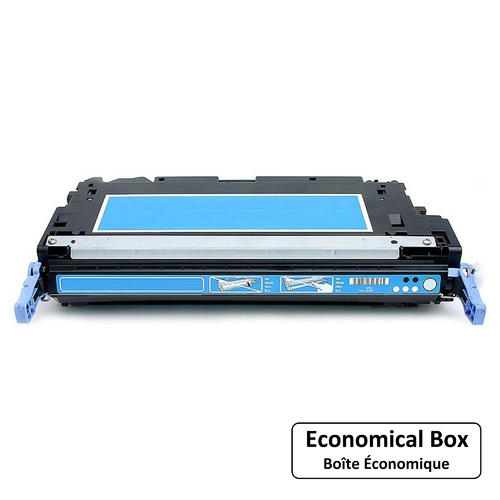
HP Q6471A (502A) Compatible High Yield Cyan Toner Cartridge
Canadian Stock, Fast Shipping
Ships from our Canadian warehouse. No border delays, no surprise duties. Delivery in 2–5 business days across Canada.
HIGH YIELD – UP TO 6,000 PAGES
Save up to 40% vs OEM with our premium HP Q6471A (502A) compatible cyan toner.
Toner ink Canada Inc offers the HP Q6471A (502A) compatible cyan toner cartridge. It delivers vibrant, consistent cyan prints and reliable performance for your HP Color LaserJet or Canon imageCLASS printer.
This high yield cartridge prints up to 6,000 pages and includes a smart chip for accurate toner level tracking.
Request a Bulk Quotation
Need multiple cartridges? Fill out the form and we will reply within 24 hours.
Technical Specifications
|
Specification |
Details |
|---|---|
| Brand / Supplier | Toner ink Canada Inc – Premium HP Compatible |
| OEM Equivalent Part Numbers | HP Q6471A / HP 502A / HP 502A Cyan |
| Color | Cyan |
| Page Yield | Up to 6,000 pages |
| Printing Technology | Laser – Color |
| Chip | Smart chip included – shows accurate toner levels |
| Shelf Life | 24 months in original packaging |
| Warranty | 2-year manufacturer warranty |
| Compatible Printers | HP Color LaserJet 3600dn HP Color LaserJet 3600N Canon imageCLASS MF8450cdn |
| Package Contents | 1 x HP compatible Q6471A cyan toner cartridge, installation guide |
Frequently Asked Questions
Is this HP Q6471A compatible toner safe for my printer?
Yes, our HP Q6471A compatible toner cartridges are manufactured to meet or exceed OEM specifications. Each cartridge undergoes rigorous testing to ensure perfect compatibility and reliable performance with your HP Color LaserJet or Canon imageCLASS printer. The smart chip is fully updated to work with the latest printer firmware.
What is the page yield of this cyan toner cartridge?
This HP Q6471A (502A) compatible cyan toner cartridge offers a high yield of up to 6,000 pages based on 5% coverage. This makes it an excellent choice for busy offices and high-volume printing environments.
How do I install this toner cartridge?
Installation is simple. Remove the old cartridge from your printer. Take the new cartridge out of its packaging. Gently rock the cartridge back and forth to distribute the toner evenly. Remove the protective tape and plastic shield. Insert the new cartridge into the printer until it clicks securely into place. Close the printer cover and print a test page.
What should I do if my printer shows a non-HP cartridge warning?
Our cartridges come with an updated smart chip that is designed to communicate properly with your printer. If you still see a warning message, simply press OK or Continue on your printer display. The message will not affect print quality and will usually disappear after a few prints.
How long is the shipping time within Canada?
We ship from our warehouse in Mississauga, Ontario. Standard delivery takes 2 to 5 business days across Canada. Express shipping options are available at checkout for faster delivery.
Do you offer bulk pricing for businesses?
Yes, we offer competitive bulk pricing for businesses and organizations. Please fill out the bulk quotation form on this page or contact us directly at 647-872-6849 or info@tonerinkcanada.ca for a customized quote based on your volume needs.
Common Troubleshooting Tips for HP Q6471A (502A) Cyan Toner
- Print is too light or faded: Remove the cartridge and gently rock it back and forth to redistribute the toner. Check that you have removed all protective tape and that the cartridge is properly seated.
- Streaks or lines on printed pages: Run the printer's cleaning cycle from the settings menu. Check that the drum unit is clean and free of debris. If the problem persists, try a different cartridge to isolate the issue.
- Printer does not recognize the cartridge: Turn off the printer, wait 30 seconds, then turn it back on. Remove and reinstall the cartridge firmly. Make sure the smart chip contacts are clean and not damaged.
- Toner leaking or spilling: Ensure the cartridge is properly sealed and not damaged. Check that you are using the correct cartridge model for your printer. Contact our support team for replacement if needed.
- Uneven print quality across the page: Check your printer's paper type settings and ensure you are using the correct media. Run the printer's calibration process from the maintenance menu.
- Cyan color appears off or incorrect: Run color calibration from the printer's control panel. Check that other color cartridges are not running low.
If you continue to experience issues, please contact our technical support team at 647-872-6849 or email us at info@tonerinkcanada.ca for assistance.
Reviews
Our Trusted Brands
Brother
Xerox
HP
Canon
Epson
Lexmark
My Wishlist
Wishlist is empty.
Compare
Shopping cart